Pivot Proposals
Win the work. Skip the busywork.
Selected work
A proposal tool for the people who write the code. Describe a project, pick the stack, and get a structured proposal draft to review, refine and share.
Try Pivot ProposalsBuilt by Pivot & Anchor, a design and engineering studio.Good developers undersell themselves, and it's structural. They spend their days inside the code, not inside the sales process. So the quote gets typed into an email, the rate is whatever felt fair last time, and nobody writes down what happens when the scope moves. The work that wins the work is the part most engineers like least.
We built Pivot Proposals because we kept hitting this ourselves. Every engagement the studio takes starts with a proposal, and writing each one by hand was eating real time. So we made the tool we wanted: describe a project in plain language, pick the stack, and it drafts a full proposal, an executive summary, a scope with the out-of-scope items spelled out, a timeline, the technical approach, a priced breakdown, and terms. You read it, refine it, and send it.
It turned out other developers wanted the same thing. It runs as a real product now, free to start with a Pro tier for the deeper analysis and unlimited proposals. The architecture is the same one we'd use for any product we ship.
From a blank page to a sent proposal

01 — Describe the project
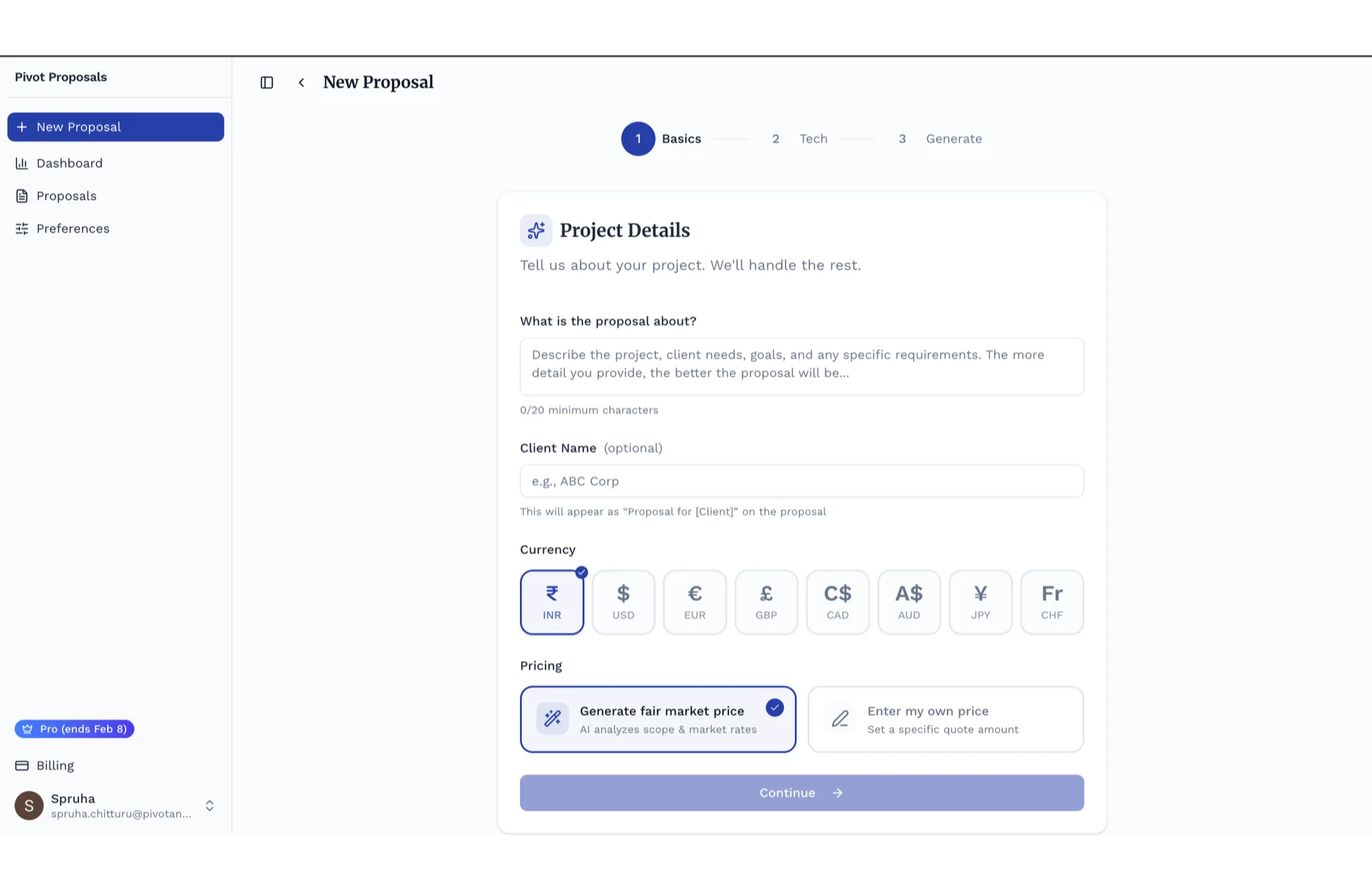
Plain language in
Step one is a sentence or two on what's being built, who it's for, and the currency you bill in. Hand the pricing to a market-aware estimate or set your own. No template to fight, no blank document to dread.
02 — Pick the stack
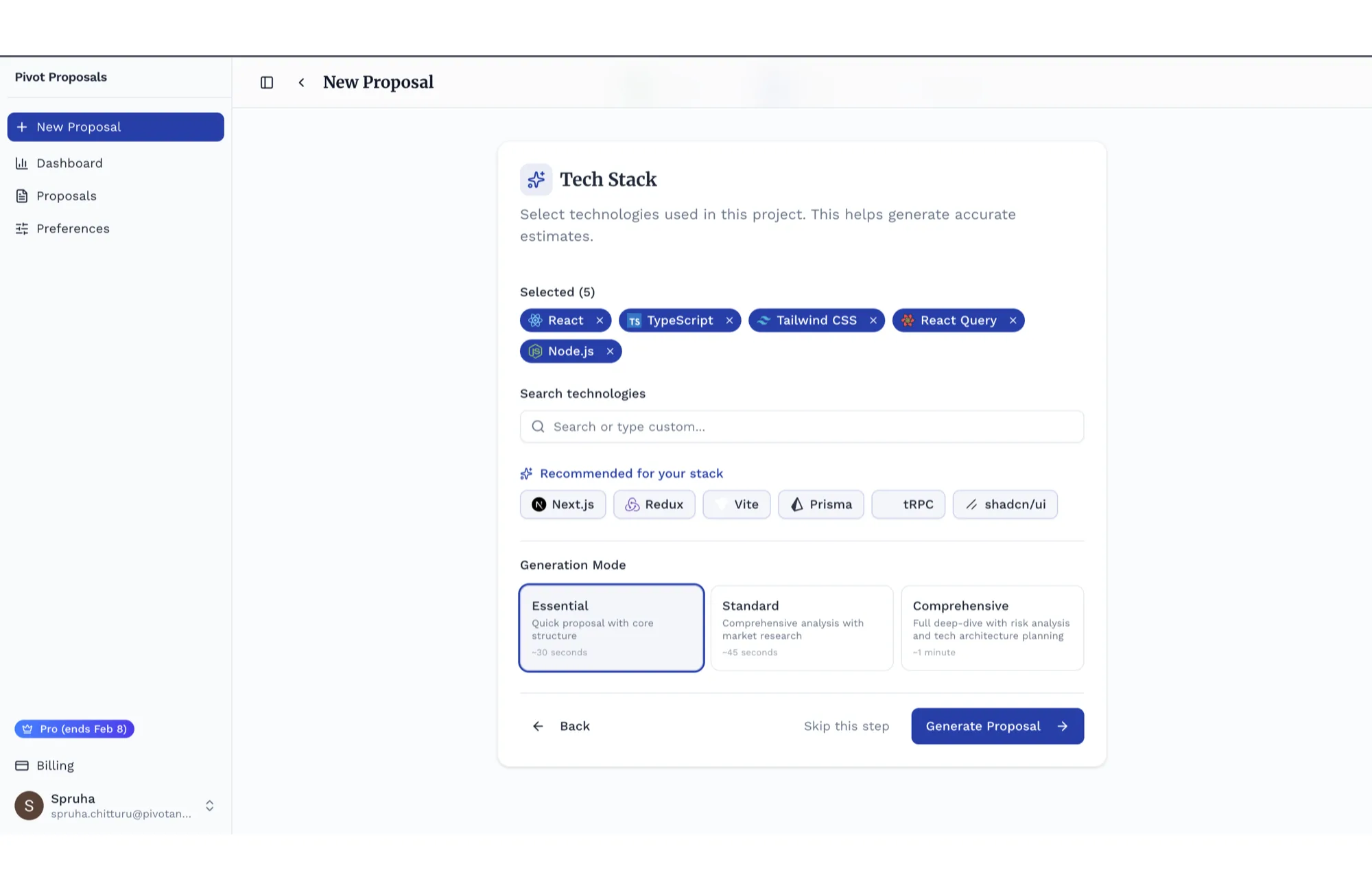
So the estimate is real
Choose the languages, frameworks, and services you'll actually use, and the tool suggests the rest of your stack as you go. A depth toggle (Essential, Standard, Comprehensive) sets how far the analysis runs. Now the proposal talks about this build, not a generic one.
03 — See the reasoning
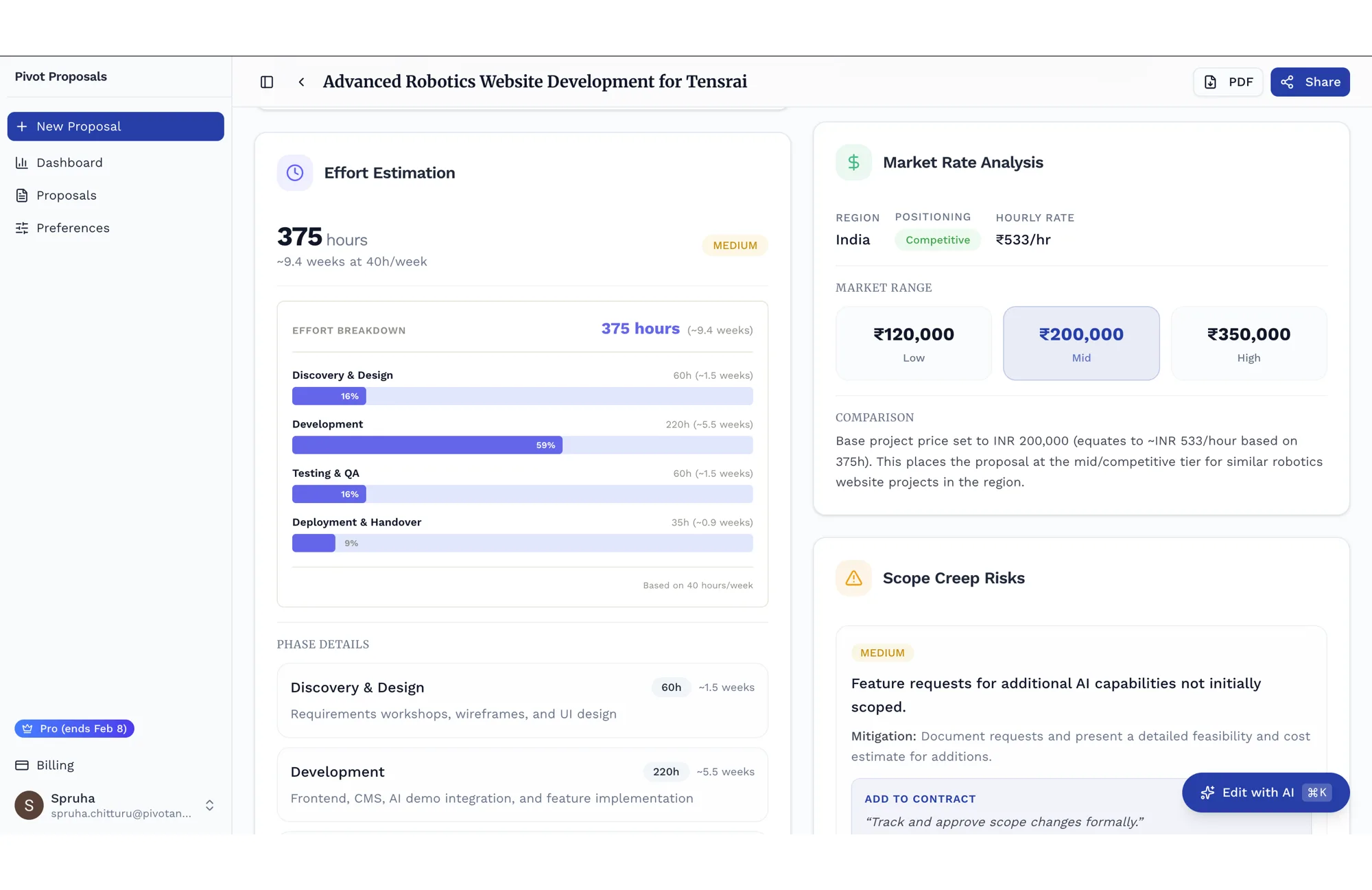
Effort, market rate, and the risks named
The analysis shows its work. Effort is broken down by phase into hours and weeks, a market-rate read places your price against the regional going rate, and project-specific scope-creep risks can be folded straight into the contract. You can defend the number and protect the scope.
04 — Send it
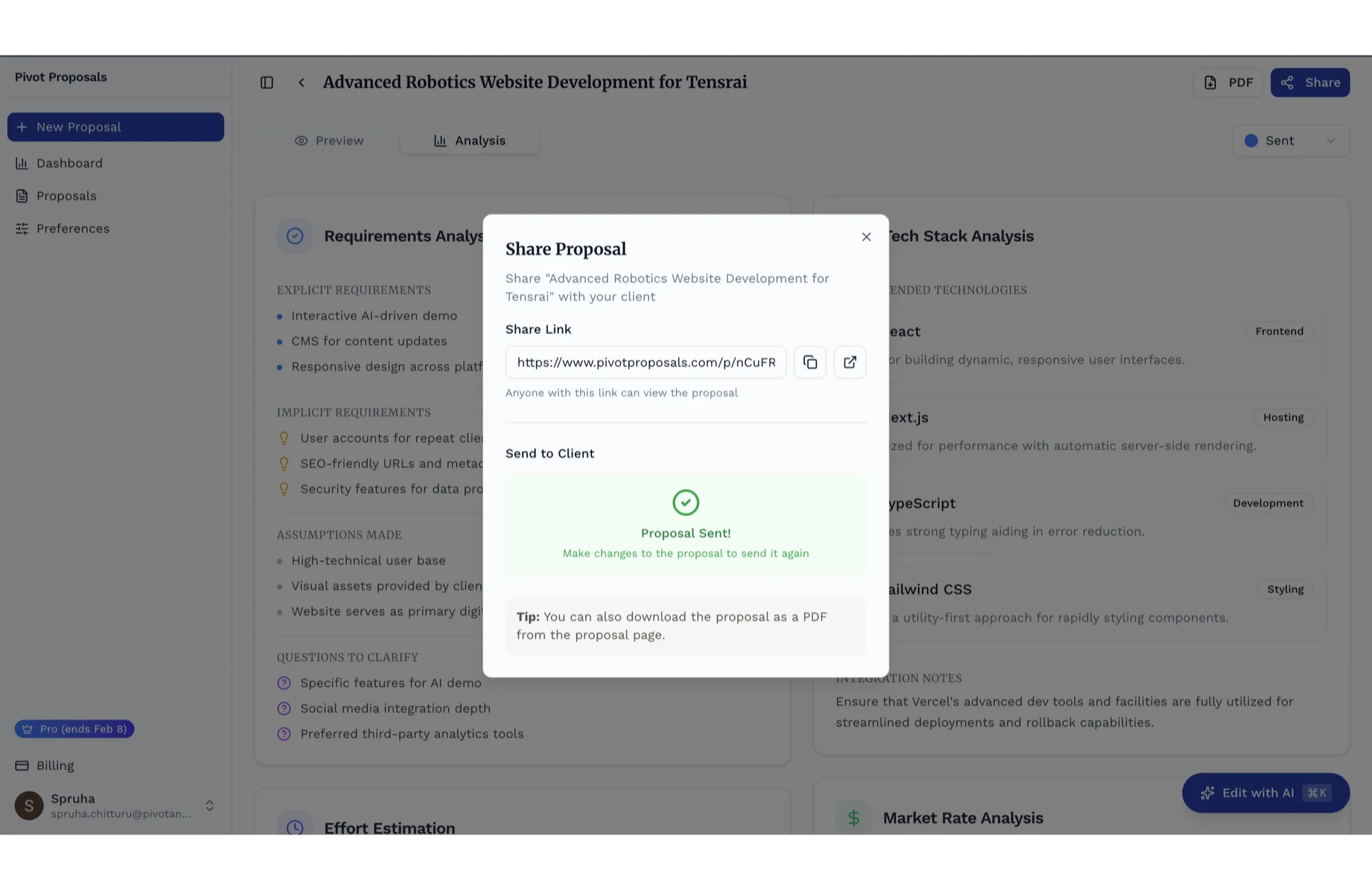
A link, a clean view, a PDF
Share a private link to a polished, read-only client page, send it straight from the app, or export an A4 PDF. The client opens a finished proposal, not a shared doc, and you see when it lands.
05 — Track everything
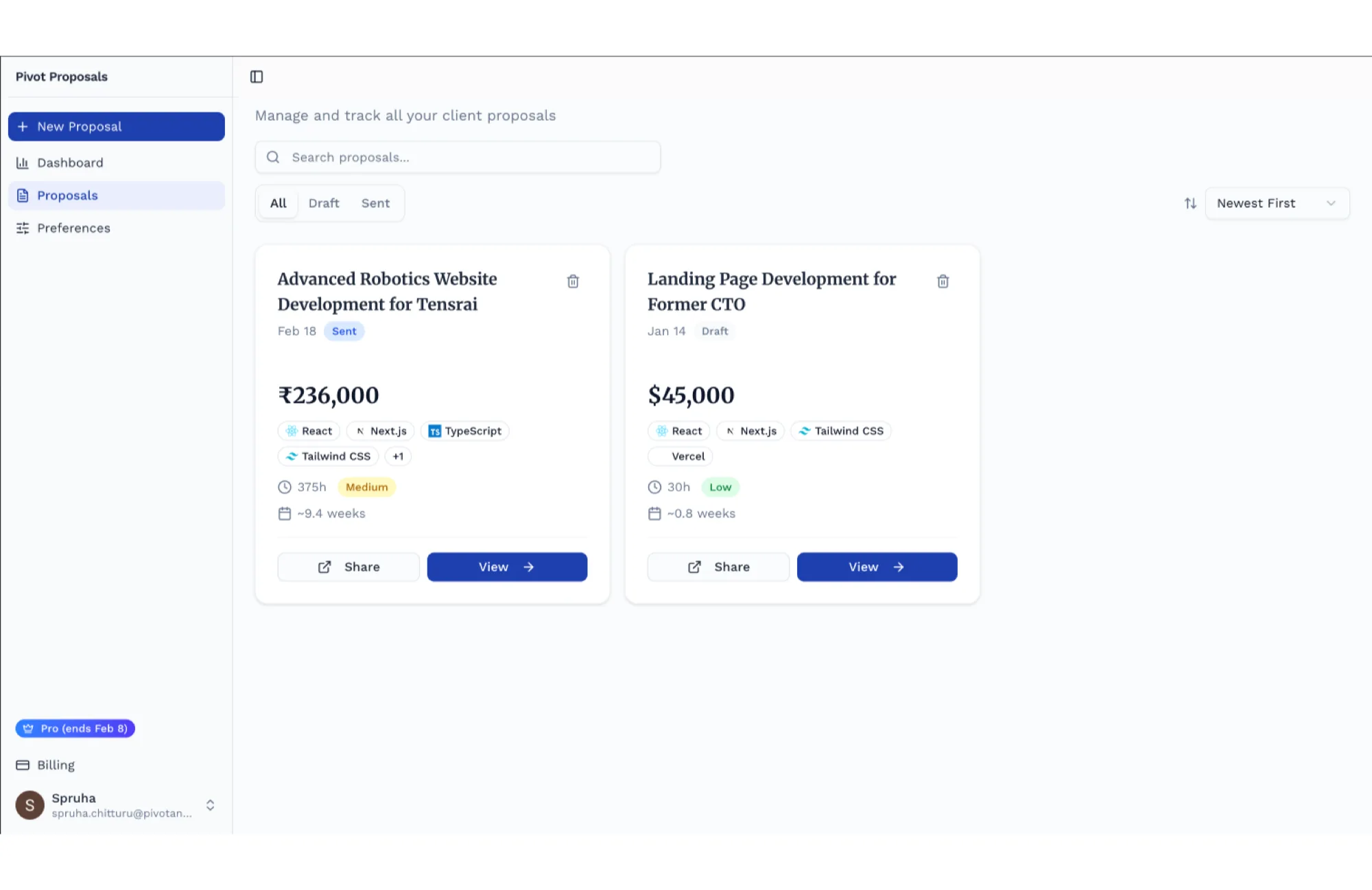
Every proposal in one place
All your proposals, searchable and filterable by draft or sent, each showing its value, stack, effort, and complexity at a glance. The current state of every proposal stays visible without a separate tracker.
06 — Read the numbers
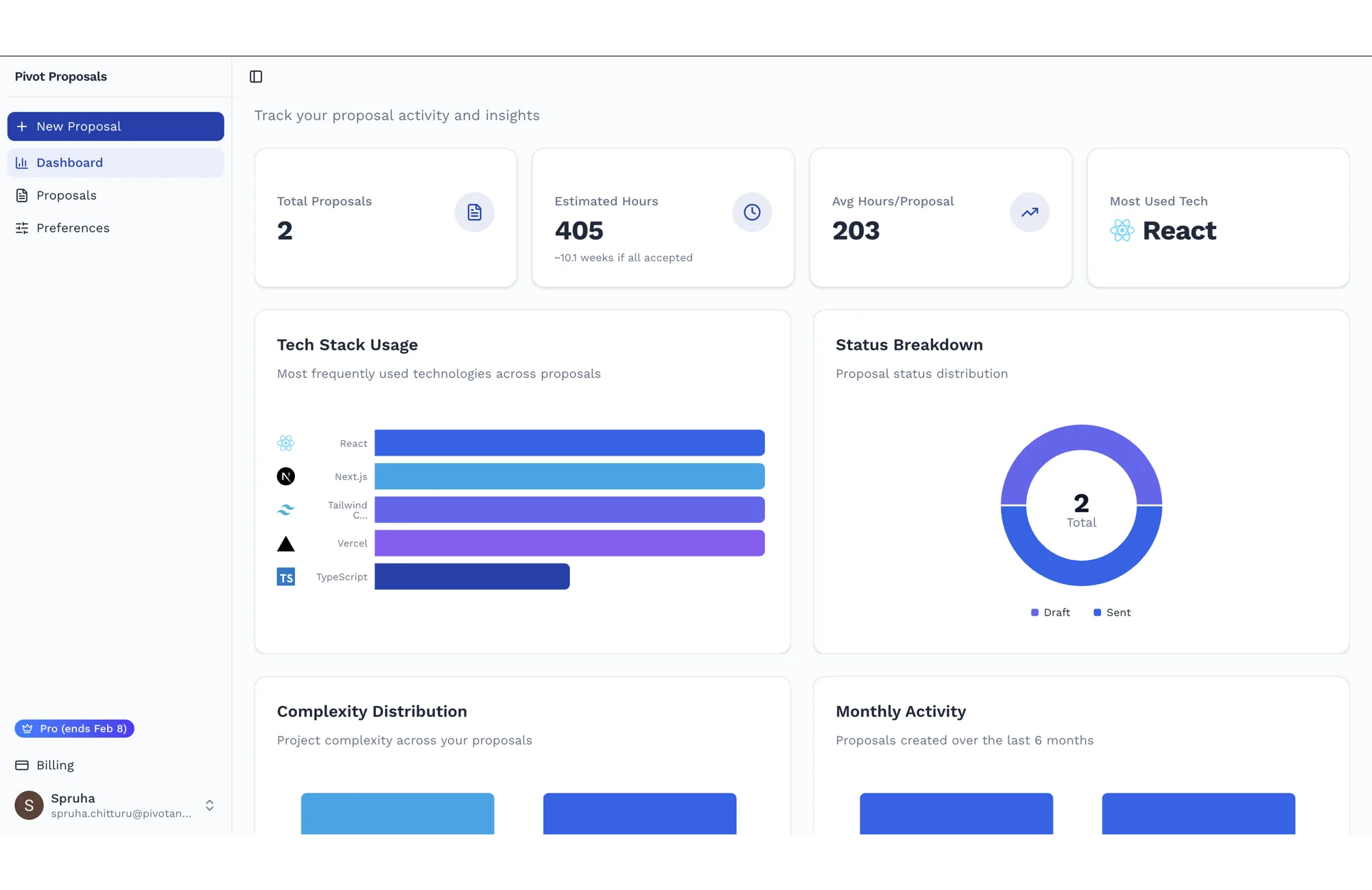
The dashboard
Across every proposal, you see how many you've written, the hours you've quoted, your most-used tech, and the split between draft and sent. The dashboard turns proposal activity into something you can inspect.
What it does
Plain language to structured draft
Describe the work and pick the stack; out comes a reviewable starting point: summary, scope, timeline, approach, priced breakdown, and terms.
Three depth tiers
Essential covers the proposal itself. Standard and Comprehensive add the analysis: effort, a market-rate read, and project-specific scope-creep risks.
Section-level AI editing
Ask for a change in words and the model rewrites that section in place, cascading the edit to the parts that depend on it.
Share by link or public view
Every proposal gets a private share link and a clean, read-only client view, so what the client sees looks finished.
PDF and email
Export an A4 PDF or send the proposal straight from the app, branded and ready to forward.
Plans and billing
A free tier to start and a Pro subscription for unlimited proposals and the deeper analysis, with usage tracked per month.
Pivot Proposals is a Next.js app on Vercel, with Clerk for auth and Supabase Postgres for data. Database requests go through server-side application logic, so the browser never receives database credentials; the tables also carry row-level policies as a second boundary. Proposals, usage, subscriptions, edit history, and clients each have their own table; a proposal's content and analysis are stored as JSON so the document can grow without a migration.
The generation is the heart of it. We drive a large language model through the Vercel AI SDK and ask for structured output validated against a schema, so a proposal always comes back with every section present and correctly shaped. The request retries with backoff if the model times out or returns something incomplete, progress streams to the browser while it works, and the finished proposal is saved on the server, so a closed tab never costs you a generation. The prompt itself is where the studio's proposal craft lives: lead with business outcomes over technical detail, tie every feature to why it matters, and always name what's out of scope. Section-level editing runs in two phases, the model plans the edit, then applies it, so a single request can update several linked sections at once.
Around that sit the unglamorous parts that make it a product: serverless PDF rendering with a headless browser, Razorpay subscriptions with idempotent webhooks and a real state machine, transactional email with a daily engagement cron, and product analytics, error monitoring, and web-vitals tracking wired in from day one.
The hard parts
Structured generation that fails safely
Schema-validated output, retried with backoff, and saved server-side, so incomplete model responses are rejected and a finished draft is not lost to a dropped connection.
The proposal as a prompt
Encoding a useful proposal structure, outcomes over jargon and scope protection built in, so the draft gives an expert a stronger place to start.
Section-level AI editing
A plan-then-apply edit loop that lets one request rewrite a section and cascade the change to everything that depends on it.
Serverless PDF
Rendering a clean, paginated document with a headless browser inside a serverless function, fast enough to feel instant.
Sharing and view tracking
Unguessable share links to a public client view, with opens and views tracked so you know when a proposal landed.
Subscriptions as a state machine
Mirroring the payment provider's lifecycle through idempotent webhooks, with monthly usage limits that gate generation and the Pro features.
Three faces, each with a job. Merriweather gives headings a considered, editorial weight; Work Sans keeps the interface clean; Montserrat sets the proposal document itself, so what the client reads feels like a finished thing.
- MerriweatherHeadings
- Work SansInterface & body
- MontserratThe proposal document
Blue does the work: it reads as trust and clarity, which is the whole job of a proposal. Navy carries the type, slate carries the quiet copy, and one red is held back for anything that needs a second look.
- Royal blueThe accent. Primary actions, links, the live state, and the brand's one confident note.#2563EB
- Deep blueThe primary surface colour, for solid buttons and headers that need weight.#1E40AF
- NavyText and the darkest UI. The interface reads as ink on paper, not as colour.#0F172A
- SlateSecondary text and labels, the quiet half of the hierarchy.#64748B
- HairlineBorders and dividers, doing the structural work in place of fills.#E2E8F0
- Alert redErrors and destructive actions only, never decoration.#DC2626